

Automate Your Accounting.
Sync with 
Automatically sync your data from evitalsupply to
Your Favorite Accounting Software - Tally.



Benefits of Integration
Sync your all the data into Tally. No Manual Entry Needed

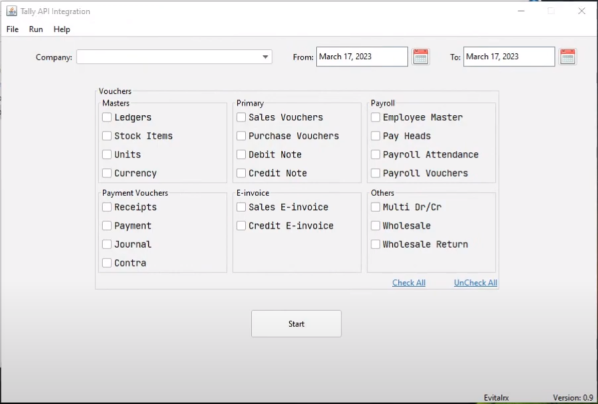

Get all your Accounting Reports of your Pharmacy directly in Tally.
FAQs (Frequently Asked Questions)
-
What happens if there is a power cut while transferring data between eVitalRx and Tally?
In the situation of a power cut while transferring data, the sync process with Tally stops, and no data loss occurs. you can see data in tally which transferred successfully.
-
If my sales do not match in eVitalRx and Tally, what should I do?
In this situation, there are two possible reasons:
1. Network Error
2. Edits made in eVitalRx after data has been synced with Tally.
Solution: To resolve this issue, you have to remove that month's synced data and sync it again.
-
How can I store same voucher numbering which present in eVitalRx?
For same voucher numbering as eVitalRx there is one setting in Tally that you have to set.
a. Go to Voucher Type in Tally.
b. Select the Voucher Name.
c. Set the Method of voucher numbering to 'Automatic (Manual Override)'.
d. Set Prevent Duplicates to 'Yes'.
-
In which format, b2c sales data synced with tally in this integration? ‘Day wise’ or ‘bill wise’?
You can view b2c sales data in both formats, 'Day wise' as well as 'bill wise.' In the 'Day wise' records, each entry is associated with the payment method of that record, such as date + payment method.
-
Does this integration provides inventory of chemist present in eVitalRx?
No, this integration doesn’t provide inventory of chemists present in eVitalRx.
-
Are all customer names, who buy products from my pharmacy, visible in Tally?
No, names of those b2c customers are stored as general customers. b2b customers and distributors names are stored as it is in Tally.
-
If I enter one bill on credit and sync today after that day i received payment and sync again then is it synced?
Yes. If you enter a bill on credit and sync it, and then receive the payment on next day and sync again, the payment will also synced to Tally.
-
If we enter a record from the eVitalRx Bank Account Section and sync it, will it be visible in Tally?
If the inserted record's payment type is UPI or cash, then it will show in Tally; otherwise, it will not.
-
The purchases from "ABC Pvt. Limited" with different GST percentages wise it will be stored slab-wise in Tally. CGST and SGST will be calculated as a based on GST percentage.
-
Is Auto Sync is available in this integration?
Yes, Auto Sync is available in this integration. However, there is a condition: for successful auto-sync, your Tally should be open.
-
Is Tally Integration compatible with all versions of Tally Software?
Yes, tally integration of eVitalRx is compatible with all versions of Tally Software.
-
What is the core requirement of using this Integration?
With the help of Tally integration, you can export reports in a single click and view reports like balance sheet in tally.
-
Can we customize the integration according to specific requirements?
No, you can’t customize the integration according to requirements.
-
I have chain pharmacies, then how is the pricing of Tally integration managed?
The pricing for Tally integration is managed store-wise. It depends on how many stores you have.
-
Where can I get the necessary files and materials required for Tally and eVitalRx Integration?
You have to contact with Tally Connect software customer care mobile: 9033071737 or email: support@evital.in for credentials and required files.
-
Is there a limit of data that can be transferred between eVitalRx and Tally?
No. There is no limit of data that can be transferred between eVitalRx and Tally.
-
How much time does this integration take during syncing between eVitalRx and Tally?
This Integration takes approximately one minute to sync 5000 records to Tally.
Support
With deep knowledge of our software and your pharmacy, evitalsupply support team members are committed to your success
Monday to Saturday. 10 am to 7 pm
Services
Our implementation team will remotely configure your PC to set you up for making profits
Technical experts will guide you with step by step onboarding process
Training
Get help when you need it. Access our Demo videos on YouTube with explanation of each feature and how you can use them
We also conduct "Chai Pe Charcha" every Saturday at 4 pm to solve your queries and get valuable feedbacks